


Updates for the GPS disciplined frequency standard
The GPSDXO module can be updated. To perform an update, you need the following:
- Micro-USB cable
- PC or laptop running Windows(TM) 7, 8 or 10 (any edition)
- Updater application from Cartain
- the firmware file update.bin
Step 1:
Connect the GPSDXO to your Windows PC / laptop with the USB cable. This should install a new COM port on your system. If you are asked for a driver, you can download it here.
Step 2:
Download the Updater program to your PC or laptop and launch it. Only launch it AFTER the USB cable has been connected, the GPSDXO has been recognised by the system and the driver has been installed properly.
ATTENTION! Sometimes the status line shows "ERROR" after starting the update. Just click "Start Update" once again and it will run through.
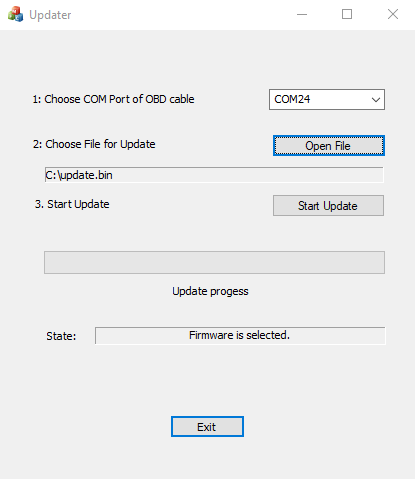
Step 3:
Choose the COM port from the list that was added when you connected the GPSDXO via USB. If you are unsure which one is correct, first start the Updater program with the GPSDXO disconnected. Then close it, connect the GPSDXO again and start the Updater program again. You should now see an additional COM port. Choose this one.
Step 4:
Click on "Open File" and choose the firmware file. The latest firmware is from 13 February 2020.